When someone searches “real or AI image,” they often want to see the difference in a concrete case rather than read the full verification workflow again. The examples below focus on portraits, product photos, and landscapes. For the complete source, metadata, reverse-search, and detector workflow, read the AI image verification guide.
1. AI-Generated vs. Real Portraits
.jpg)
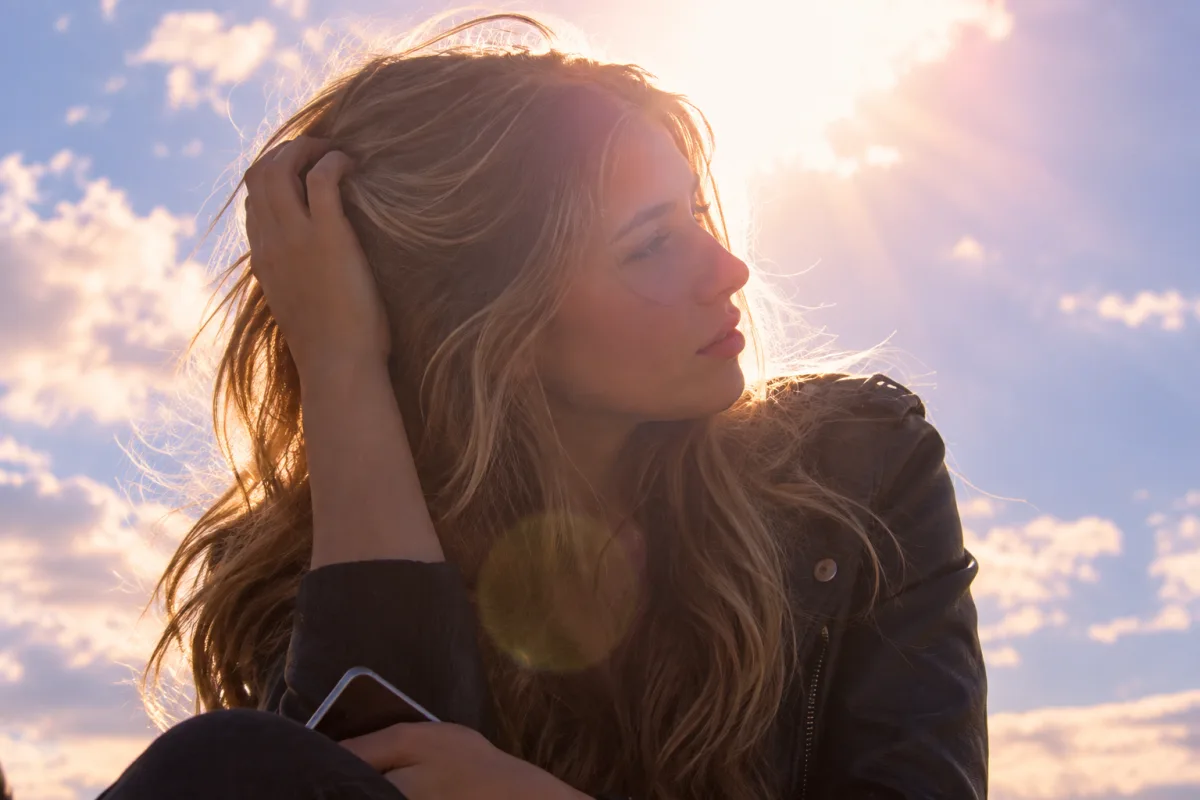
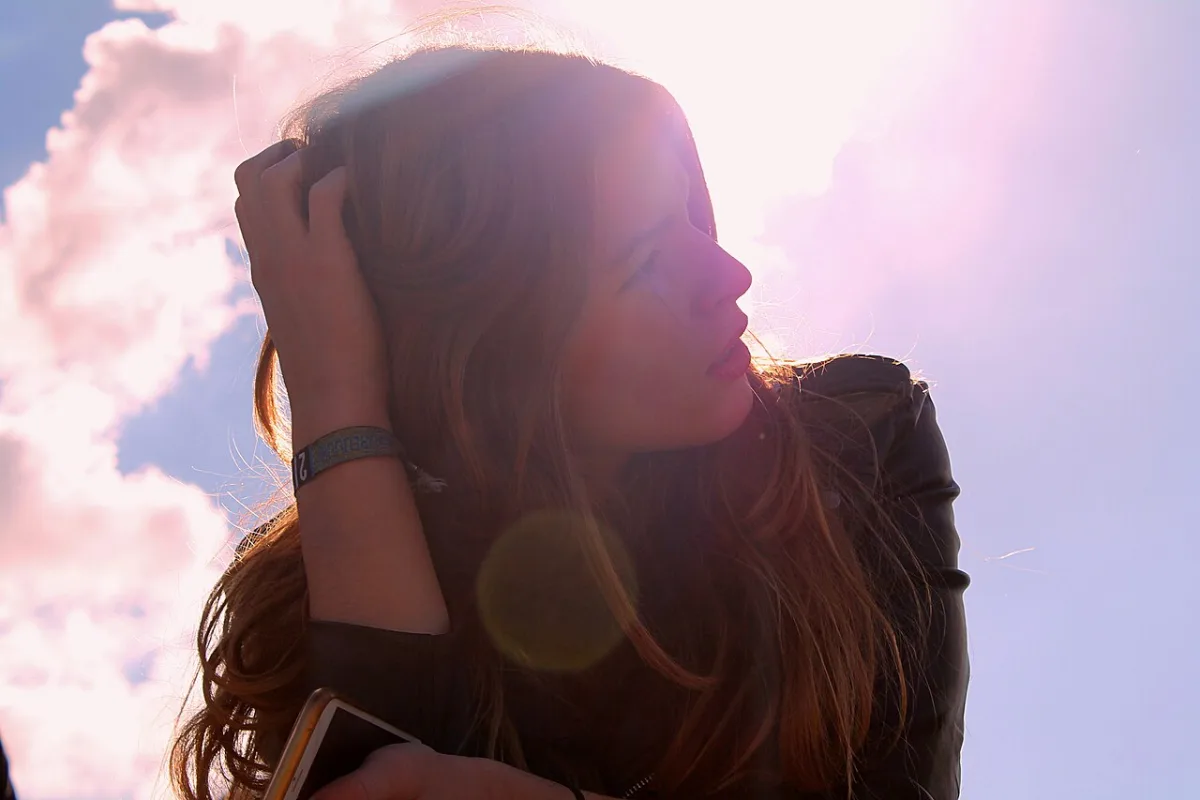
First, look only at the pixels. Both images use a similar profile, raised hand, and strong backlit composition, so the comparison keeps the visual task closer. The AI recreation on the left has more controlled facial contours, hair strands, and skin highlights; the real photograph on the right has natural underexposure, lens flare, and uneven hair edges. Even here, no single skin texture or lighting effect should be treated as a fixed test.
Now compare provenance. The Wikimedia file page for the real photo names the photographer, Paris location, 2015 date, and camera data: Canon EOS 1100D, 55 mm, ISO 100, 1/320 second, and f/11. Metadata can be edited, so those fields are not proof by themselves. However, the author, place, date, original publication record, and camera settings form a coherent trail that another person can inspect. The decisive fact for the left image is not the face; it is that we know the image was created with a generator.
This comparison shows the practical difference between the two checks. Visual inspection finds contradictions; provenance explains where the image came from. For a question such as “Was this made by AI?”, a documented creation record should outweigh another round of guessing from pores or fingers.
For a portrait, begin with paired details. Catchlights do not need to be identical, but one lighting setup should explain both eyes. Earrings can differ, but the difference should look intentional. The arm of a pair of glasses should reappear in a plausible position after passing behind the hair. For teeth and lips, do not merely count teeth. Check whether tooth boundaries vanish abruptly at the lip, or whether the gums become one impossible white band.
Then inspect the boundaries between hair, skin, clothing, and background. Fine hair in a real photo may glow in backlight, soften outside the focus plane, or disappear after compression. A stronger anomaly is one lock of hair turning into skin, fabric, and background within a few centimeters. Missing pores are weak evidence because beauty retouching and phone portrait modes can create the same effect. Lighting relationships are more useful: do the highlight on the nose, shadow in the eye socket, cast shadow below the chin, and dominant background light agree?
If the portrait appears in dating, hiring, or marketplace interactions, check whether the person exists beyond this one frame. Reverse-search the profile photo, look for images from different dates, angles, and settings, and see whether a live video or requested photo is consistent with the identity claim. A perfect face proves neither that the image is AI nor that the account represents a real person.
2. AI-Generated vs. Real Product Photos
For product-photo comparisons, inspect packaging text, logo edges, repeated buttons or caps, and the contact shadow and reflection between the product and its surface. Real product photography can also use background replacement, lighting effects, or compositing, so the useful question is whether the product shape, label, perspective, and shadow remain consistent within one scene.
3. AI-Generated vs. Real Landscape Photos
Landscapes are useful for checking depth, repeated trees or buildings, water reflections, and layers of atmospheric perspective. Panorama stitching, HDR, denoising, and social-platform compression can also create unnatural edges, so one strange branch or cloud does not prove AI. Follow whether the same perspective and light continue through the foreground, middle ground, and distance.
4. How Cropping and Compression Affect Visual Clues
Compression also creates false clues. A messaging-app screenshot can merge real hair into blocks, deform background lettering, and erase skin texture. Conversely, resizing an AI image can hide the local mistakes that were obvious in the original. Obtain the highest-resolution version closest to the original export before deciding. If only a thumbnail is available, label the result “insufficient evidence in this version” rather than using stronger language to compensate for missing information.
5. When AI Images Look Indistinguishable From Real Photos
New generators can produce correct hands, readable text, and natural lighting. A real photograph can also acquire an “AI look” after beauty filters, portrait blur, HDR, denoising, sky replacement, or generative fill. The better question is not always binary: which pixels came from a camera, which regions were generated or replaced, and did the publisher disclose the edit?
6. Test the Images With an AI Image Detector
For each example, record the image label, source link, and file version before uploading the closest available original to an AI image detector. Compare the detector output with the known creation context instead of treating the score as absolute proof. The complete source and result-interpretation workflow is in the AI image verification guide.
A detector analyzes the pixel signals in the current file; it does not witness the creation process. On examples with a known AI or photographic origin, the result can show what the model notices. For an unknown image, still combine it with structure, provenance, and file evidence. When the signals conflict, keep “insufficient evidence” or “mixed workflow” as a possible conclusion.
Frequently Asked Questions
How do I check a real or AI image?+
Find the original publisher and earliest post, then zoom into hands, text, reflections, hair overlaps, and background people. Inspect metadata or provenance information when the original file is available, and use an AI image detector as an additional signal. Do not decide from one anomaly.
Was this made by AI if the skin looks unusually smooth?+
Not necessarily. Beauty filters, retouching, soft light, denoising, and low-resolution compression can make real skin look smooth. Continue checking hair edges, jewelry, lighting direction, background continuity, and the source.
Was this image AI-generated if it has no EXIF data?+
No. Social platforms, screenshots, editing software, and re-exporting can all remove EXIF data. Missing metadata means that the file history is incomplete; it does not prove how the image was created.
Are these photos AI if background faces look strange?+
Not automatically. Motion blur, shallow depth of field, compression, and computational photography can damage distant faces. Check whether the anomaly exists only in a low-pixel area, then compare the original file, other photos from the scene, and the source.
Was AI used in this image if only generative fill was applied?+
The most accurate label is usually “AI-edited” or “mixed workflow.” Identify which areas were generated or replaced, then apply the disclosure rules relevant to news, contests, advertising, or licensing.
Trying to decide whether an image is real or AI?
Upload the closest available version of the original, review the detection signal, and combine it with the visual and provenance checks in this guide.
Check an image